
7 Creative Things You Can Do with Photo Metadata (on Your Phone)
Most people only hear about metadata when it’s a problem: “your photo leaked your address!” That’s real, and we cover it here. But the information hidden in your photos is also a playground. Here are seven projects you can finish on your phone tonight with ExifTool.
1. Give your photos a “shot on” frame
Photography accounts love those clean frames with f/1.8 · 1/250 · ISO 100 under the picture. ExifTool builds them from the photo’s own data, in styles from minimal to film strip.
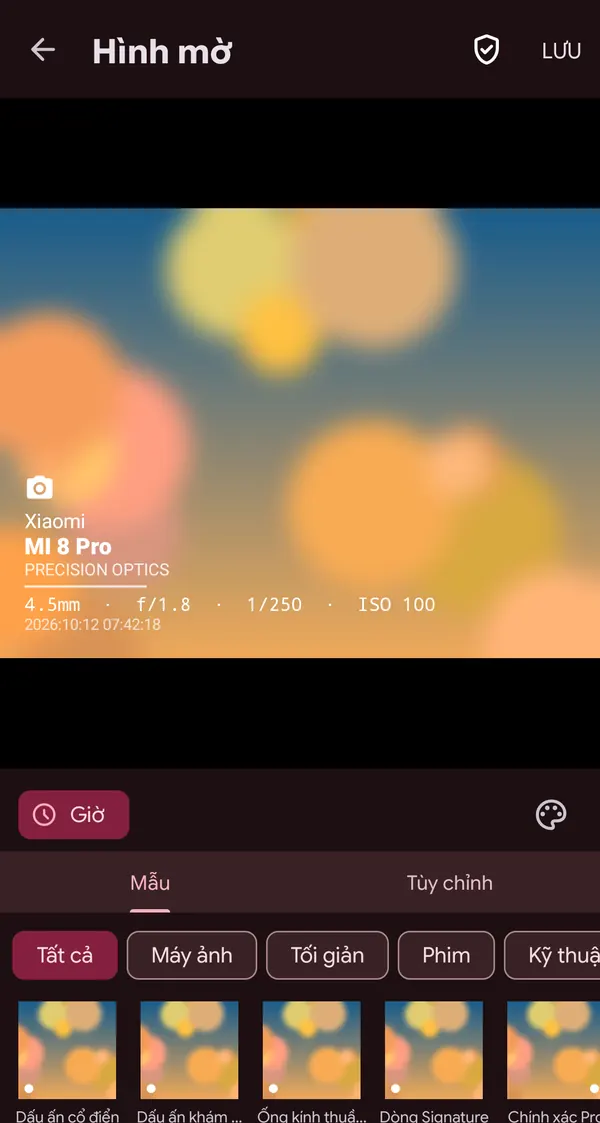

👉 How to add a camera-info frame
2. Put a whole trip on the map, from your watch
Shot a hike on a camera with no GPS? Export the GPX from your watch or hiking app and let ExifTool pin every photo to the route by time. Your gallery’s map view suddenly tells the story of the day.
👉 Geotag photos from a GPX track log
3. Rescue old scans and family photos
Scanned prints all say they were taken today. Set Date Time Original to the real year (even an approximate “1998:06:01 12:00:00”), drop a pin where it happened, and add names to the description. Now your 25-year-old photos sort correctly next to new ones and show up in “On this day” memories.
👉 Change the date taken · Set the location on a map
4. Run a “guess the settings” game
Post a photo, ask friends to guess the shutter speed and ISO, then reveal the EXIF. It’s a surprisingly fun way to learn exposure, and a great engagement post for photography groups.
👉 How to read ISO, aperture and shutter speed
5. Sign your work once, stamp it everywhere
Fill Artist, Copyright and a contact line once, save them as a tag template, and apply it to every photo you publish. If your pictures get reposted, the credit travels with the file.
6. Build a photo log in a spreadsheet
Export EXIF to CSV saves every tag of a photo to a file you can open in Sheets or Excel. Use it for a gear test (which lens is sharpest at what ISO?), a property inspection log, a contest entry or an insurance inventory with dates and serial numbers.
7. Share with zero personal data
Before you list that sofa or post a photo of your kid’s school play, use Remove location & share: your original stays untouched, and the copy you send has no location or personal tags. For a full wipe, Delete all groups strips everything (with an optional backup).

👉 Selling online? Strip metadata first
Which one will you try first? Every tool above lives in ExifTool’s single action menu. See them all in the complete ExifTool guide.
How to install ExifTool
- Android: Open Google Play, search for “ExifTool” or tap the Google Play badge below, then tap Install. Updates arrive automatically through Google Play.
- iPhone / iPad (beta): The iOS version is in beta on TestFlight. Install Apple’s TestFlight app from the App Store, then open the TestFlight link below on your iPhone and tap Accept → Install. If the beta is full, check back later.
Coming soon: App Store.
💡 Tip: only install ExifTool from the official stores or the links on this page, never from unknown APK/IPA mirrors. See every feature on the ExifTool page.
FAQ
Do I need a computer for any of these?
No. Every idea here works on an Android phone with ExifTool, and the iPhone version is in public beta on TestFlight.
Will editing metadata damage my photos?
Editing tags does not change the pixels. Only the watermark frame creates a new image. ExifTool can also keep an _original backup when you delete metadata.